
Duration
Description
Schema and Ontology Matching with COMA 3.0:
This page gives an overview about the schema matching systems COMA 3.0 developed at the University of Leipzig. Please consult the relevant papers (below) for a more detailed discussion of our approach. You can obtain the Community Edition of COMA 3.0 on SourceForge.net.
Introduction:
Schema and ontology matching aim at identifying semantic correspondences between metadata structures or models such as database schemas, XML message formats, and ontologies. Solving such match problems are of key importance to service interoperability and data integration in numerous application domains. The goal is to keep manual effort low.
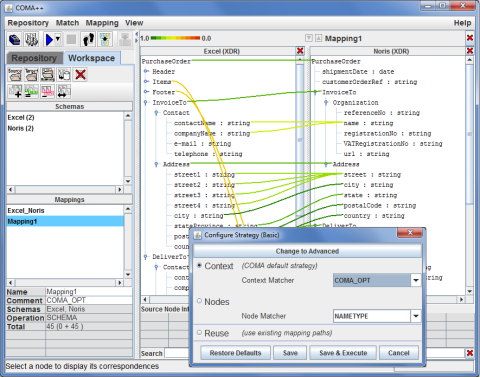
COMA 3.0 is a schema and ontology matching tool. It extends our previous prototypes COMA and COMA++ by an enhanced workflow management and additional features like ontology merging. Furthermore, it offers a comprehensive infrastructure to solve large real-world match problems. The graphical interface offers a variety of interactions, allowing the user to influence in the match process in many ways. COMA 3.0 functionality is used within the new QuickMig prototype focusing on the generation of executable mappings for data migration.
The new COMA 3.0 also integrates the ATOM prototype for automatic schema and ontology merging.
Architecture:
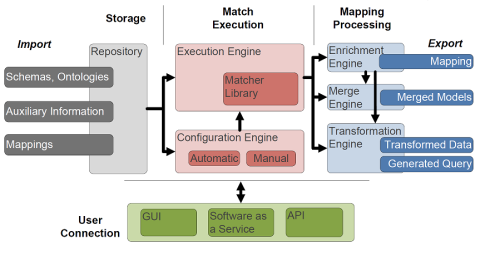
As depicted below, COMA 3.0 is divided in 4 modules, where the three modules Storage, Match Execution and Mapping Processing roughly follow the Input-Processing-Output pattern and the User Connection module provides different ways to access the program (front end). The Storage consists of the Importers that load schemas, ontologies, existing mappings and auxiliary information (like instance data, dictionaries etc.) in the Repository, where they are persistently stored. From the repository, these files can be directly used to carry out matching tasks.
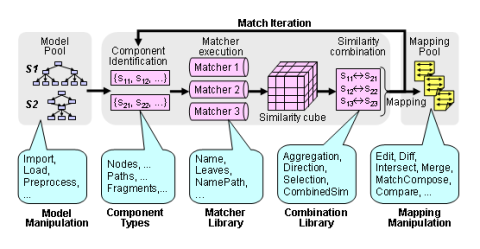
The Match Execution is the core of COMA. It gets two schemas or ontologies as input, runs several matching algorithms and calculates the match result. In this module, the Execution Engine determines the relevant schema components for matching, applies multiple matching strategies and finally combines the partial results to the final match result. The obtained mapping can be used as input in the next iteration for further refinement. Each iteration can be individually configured, i.e., the types of components to be considered, the matchers for similarity computation, and the strategies for similarity combination. The Match Library is a large bundle of schema matching strategies that can be combined to extensive workflows. Eventually, the Configuration Engine enables to automatically or manually define schema matching workflows.
The Mapping Processing module is used to carry out further tasks once the match result is calculated. It allows to automatically enrich mappings (e.g., to detect complex correspondences), merge models (ontology merging) or transform data, either directly or by generating a query script. This module is part of the COMA 3.0 Business version.
The User Connection module consists of a full-fledged GUI, a SaaS-solution and an API. For most users, the GUI might be the most comfortable and most convenient way to use COMA.
Model Support:
Using a generic data representation, COMA 3.0 uniformly supports schemas and ontologies, e.g. the powerful standard languages W3C XML Schema (XSD) and Web Ontology Language (OWL). Further formats supported by COMA 3.0 include XML Data Reduced (XDR) and relational schemas.
- XSD Support: COMA 3.0 supports very large schemas that are distributed over a multitude of XSD documents and that span various namespaces.
- OWL Support: COMA 3.0 currently supports matching between ontologies written in W3C OWL-Lite. OWL class hierarchies and relationship types are read in via the OWL API and mapped to the generic model representation based on directed acyclic graphs.
Matchers and Match Strategies:
COMA 3.0 supports a comprehensive and extensible library of individual matchers, which can be selected to perform a match operation. Using the GUI, it is easy to construct new, more powerful, matchers by combining existing ones. Moreover, it is possible to specify match strategies as workflows of multiple match steps, allowing to divide and successively solve complex match tasks in multiple stages. Due to the flexibility to configure matchers and match strategies, COMA 3.0 cannot only be used to solve match problems, but also to comparatively evaluate the effectiveness of different match algorithms.
Using the flexible infrastructure for combining and refining match results, match processing is supported as a workflow of several match steps. We implemented specific workflows (i.e., strategies) for context-dependent, fragment-based, and reuse-oriented matching, respectively:
- Context-dependent Matching. We address the problem of context-dependent matching, which is necessary for schemas with shared elements. Although required by many applications, such as transformation of XML messages, identifying context-dependent correspondences is mostly ignored by previous work. COMA 3.0 supports several strategies, which are also scalable for large schemas, to obtain context-dependent match results.
- Fragment-based Matching. To cope with large schemas, COMA 3.0 implements a fragment-based match processing approach. Following the divide-and-conquer idea, it decomposes a large match problem into smaller subproblems by matching at the level of schema fragments. With the reduced problem size, we aim not only at better execution time, but also at better match quality compared to schema-level matching.
- Reuse-oriented Matching. We pursue the reuse of previously determined match results. The main mechanism for our approach is a MatchCompose operation, which performs a join-like operation on a mapping path consisting of two or more mappings, such as A-B, B-C, and C-D, successively sharing a common schema, to derive a new mapping between A and D.
COMA Evolution:
The COMA project exists for 10 years by now, and during this decade got gradually extended and improved. Key stations are:
2002: First release of the schema matcher COMA. COMA stands for combined matching and offers a suite of several matching strategies.
2005: Release of COMA++, which now offers ontology matching and fragment-based matching. COMA++ also comes with a GUI to allow a much more comfortable schema matching.
2008: Release of the 2008 version of COMA++, which supports instance matching. Also, a web-edition is developed, containing the prime features of COMA++.
2011: Release of COMA 3.0, which is a redesigned version of COMA++. It offers ontology merging and an enhanced workflow management.
2012: The Community Edition of COMA 3.0 becomes an Open Source Project under AGPL license.
Benchmark:
In order to compare schema and ontology matchers with COMA++, a couple of mapping scenarios can be downloaded here.
What others say about COMA, COMA++:
“COMA++ is a generic, composite matcher with very effective match results.” [Duchateau et al., OTM 2008]
“COMA++ is one of the best available schema matchers that enjoys from combining several available methods for schema matching” [Nezhad et al., WWW 2007]
“The best recall and the best F-measure were achieved by COMA++.” [Kappel et al., BTW workshop 2007]
“…the COMA system … was the first to clearly articulate and embody the multi-component architecture…” [Lee et al., VLDB Journal 2007]
“The most complete tool”. [Manakanatas et al., DISWEB 2006]
“COMA is the first work to address engineering issues of a schema matching system.” [Bernstein et al., Sigmod Record 2004]
“COMA with the NamePath+Leaves matcher combination is the fastest prototype in our evaluation.” [Yatskevich, Technical Report 2003]
Project members
Publikationen (20)
| Dateien | Cover | Beschreibung | Jahr |
|---|---|---|---|

|
2014 / 9 | ||

|
2014 / 6 | ||

|
2013 / 9 | ||

|
Arnold, P.
25. GI-Workshop Grundlagen von Datenbanken
|
2013 | |
|
|
Raunich, S.
; Rahm, E.
Proc. 7th OTM Workshop on Enterprise Integration, Interoperability and Networking (EI2N\'2012), Springer LNCS
|
2012 / 9 | |
|
|
Maßmann, S.
; Raunich, S.
; Aumüller, D.
; Arnold, P.
; Rahm, E.
OM-2011 (The Sixth International Workshop on Ontology Matching, October 24th, 2011, Bonn, Germany)
|
2011 / 10 | |

|
2011 / 9 | ||

|
Groß, A.
; Hartung, M.
; Kirsten, T.
; Rahm, E.
2nd International Conference on Biomedical Ontology (ICBO 2011)
|
2011 / 7 | |

|
Groß, A.
; Hartung, M.
; Kirsten, T.
; Rahm, E.
7th International Conference on Data Integration in the Life Sciences (DILS 2010)
|
2010 / 8 | |

|
Peukert, E.
; Berthold, H.
; Rahm, E.
13th International Conference on Extending Database Technology, EDBT 2010
|
2010 / 3 |